Last Updated on October 28, 2025 by Ch David
The authentication of an Apple Watch is simpler than most people think – if you know where to start.
Because Apple’s smartwatches are so popular, counterfeit versions appear everywhere, from online marketplaces to local resellers.
Some look convincing, copying the overall design and packaging, but they can’t replicate Apple’s tightly controlled hardware or software ecosystem.
Whether you’re buying a new model or checking a secondhand one, knowing how to confirm authenticity will save you from paying premium prices for a fake device that doesn’t even connect properly to iOS.
The good news is that Apple provides an easy way to verify your watch directly through its own systems.
This guide covers how to check any Apple Watch (regardless of the series or color) with real vs fake comparisons, practical advice, and a simple verification step that instantly confirms whether your watch is genuine.
Many collectors who buy tech-driven timepieces also compare them with analog icons like the Rolex Submariner 126610 or the Omega Seamaster Diver, which face similar replica problems at a higher price tier.
We verify what imitators can’t fake: serial checks against Apple’s database, real watchOS behavior, and hardware fit & finish.
Human specialists • 24–48 h turnaround • Thousands of electronics checks since 2017
Answer: The most reliable way to verify an Apple Watch is to check its serial number on Apple’s official Check Coverage page.
Enter the number found in Settings or on the caseback. If it’s genuine, the website will confirm the model and warranty information.
Fake Apple Watches never pass this test because their serial numbers aren’t registered in Apple’s database.
This simple check takes seconds and is the fastest way to separate a real Apple Watch from a replica.
For added assurance, you can also review software behavior, packaging details, and pairing performance – all covered later in this guide.
Apple is known for not sharing their operating systems, so it’s impossible for fakes to get the serial code right.
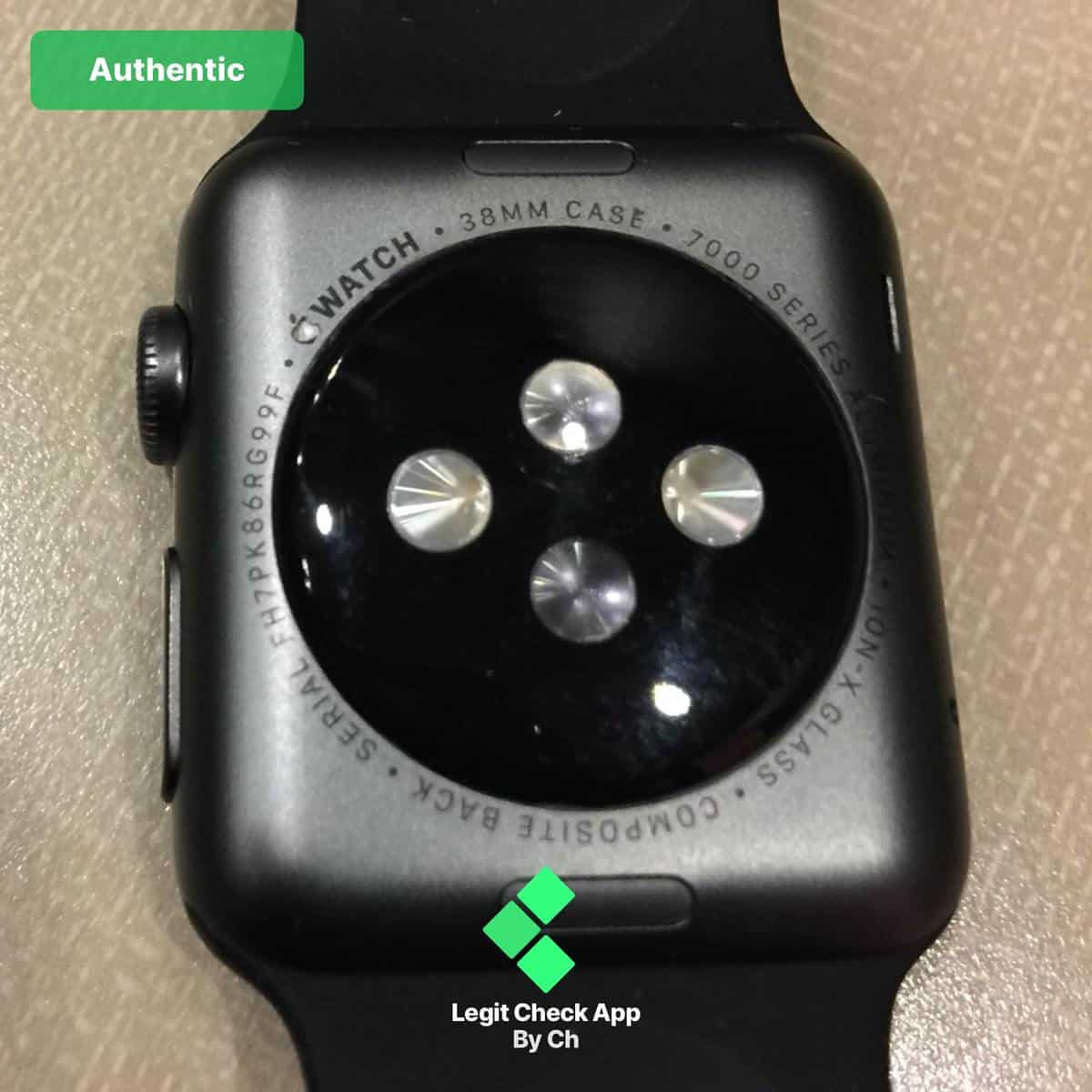
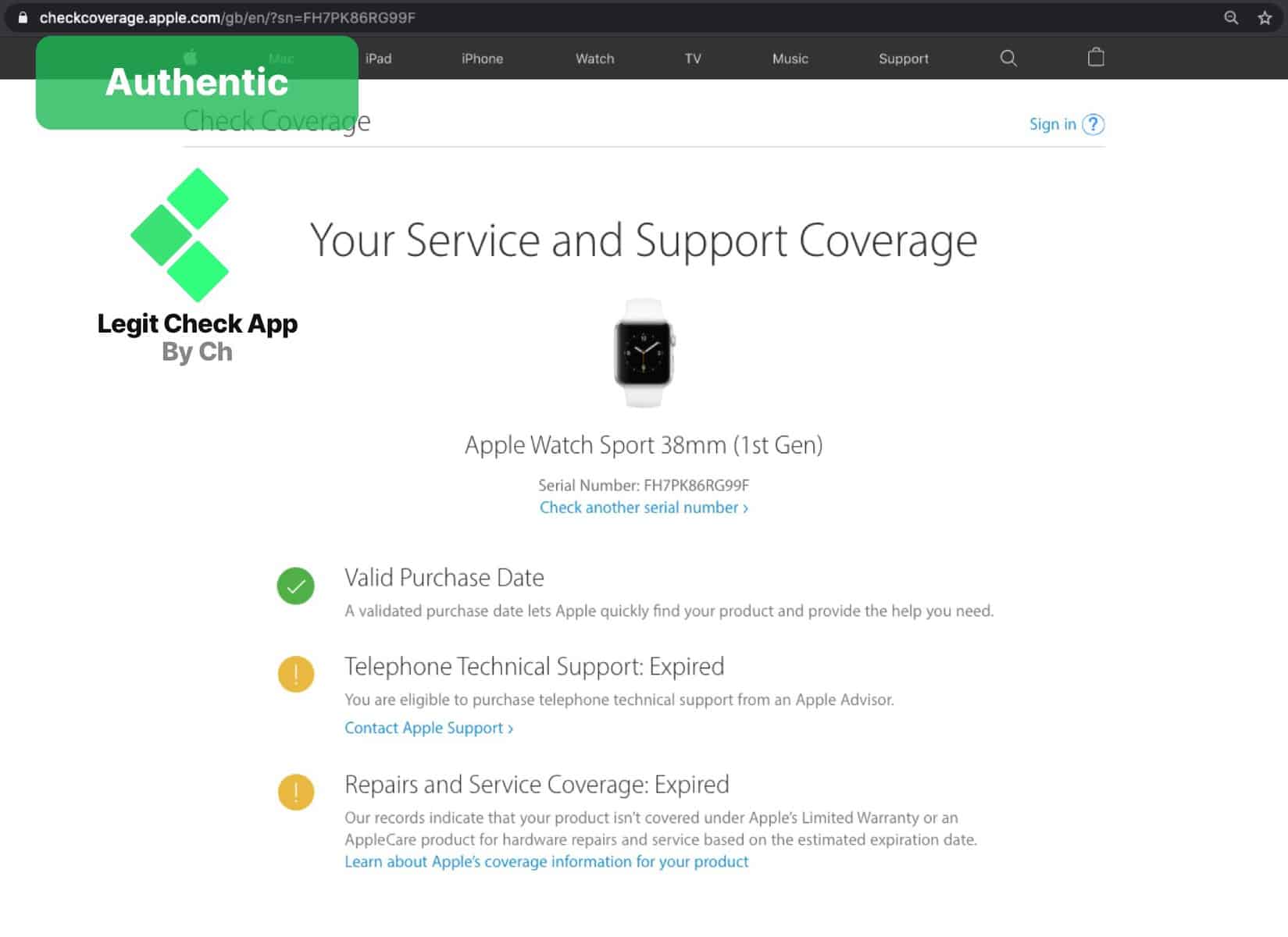
How to verify your serial number:
→ Authentic: Displays a green checkmark with the message “Valid Purchase Date.” You’ll also see warranty or service coverage details.
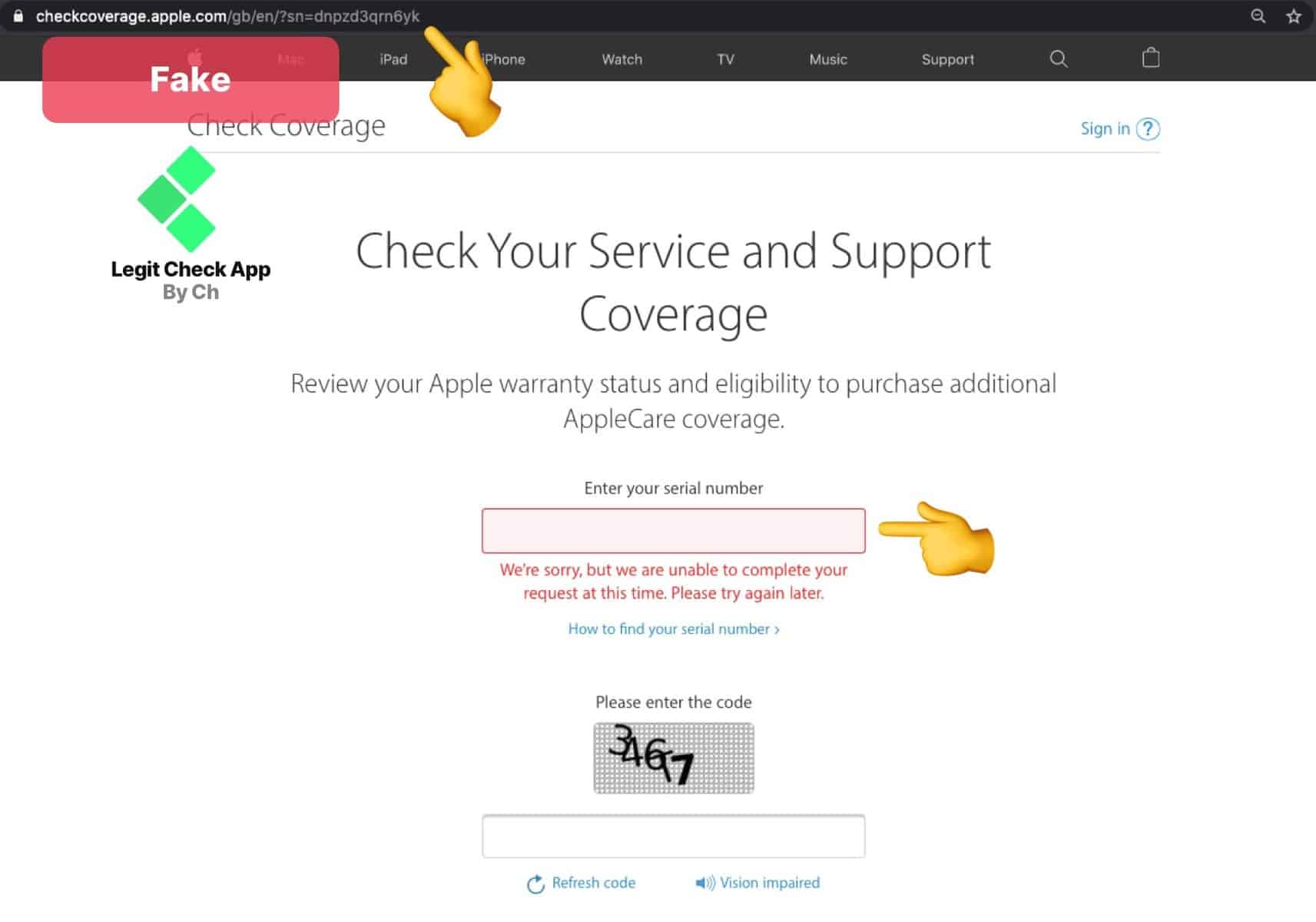
→ Fake: Displays “We’re sorry, but we are unable to complete your request at this time” or shows no valid coverage.
A green check beside “Valid Purchase Date” is one of the most trustworthy indicators that your Apple Watch is real – it confirms Apple recognizes your device in their system.
If the site can’t locate your serial number, it’s almost certainly a counterfeit, as all legitimate Apple Watches are registered in Apple’s global database.
Tip: The images above are from the test of an Apple iPhone 11, so you can also check serial numbers of iPhones, iPads, AirPods Pro, and Macs this way. The format and response messages are identical across all devices.
Serial verification is equally important when authenticating luxury watches like the Rolex Datejust.
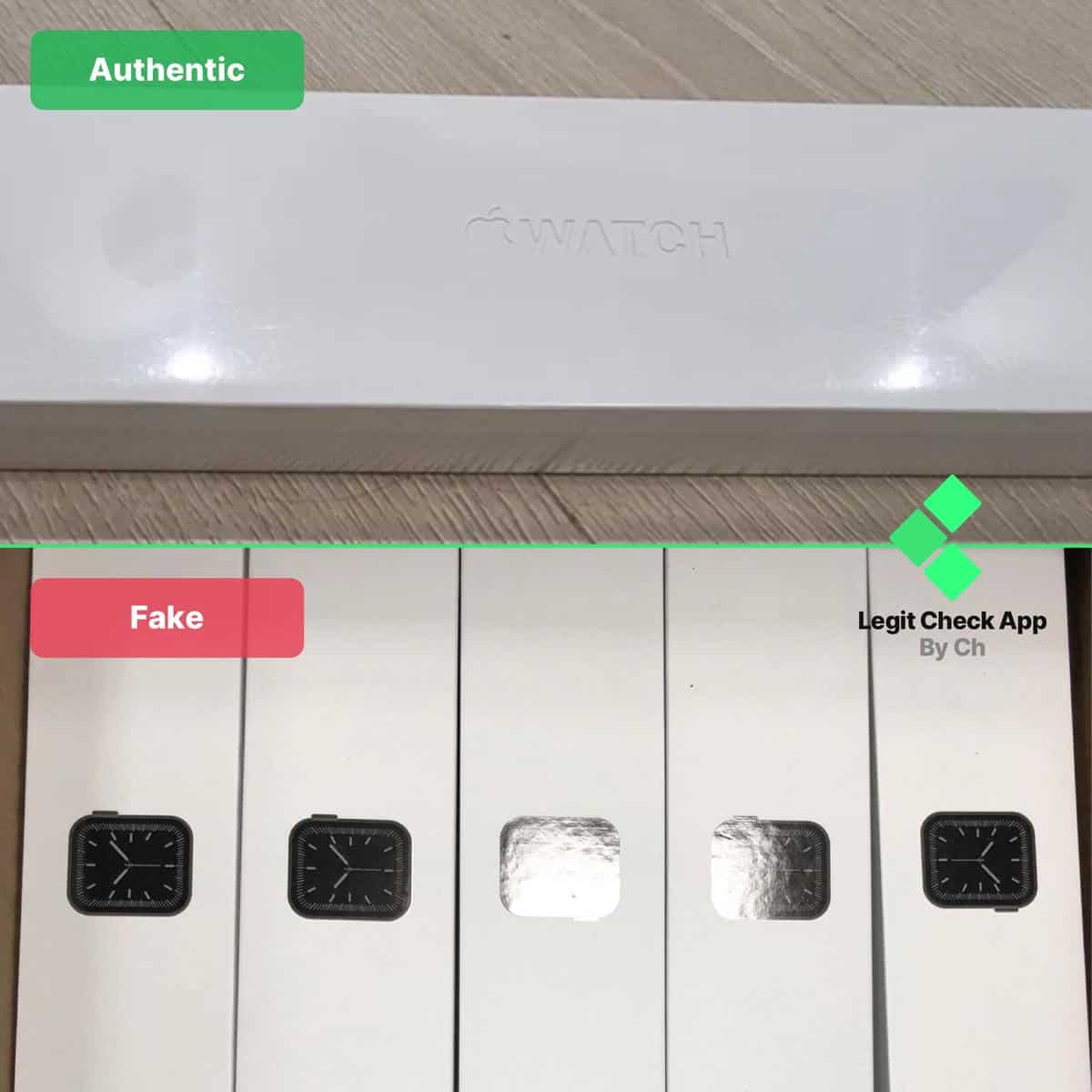
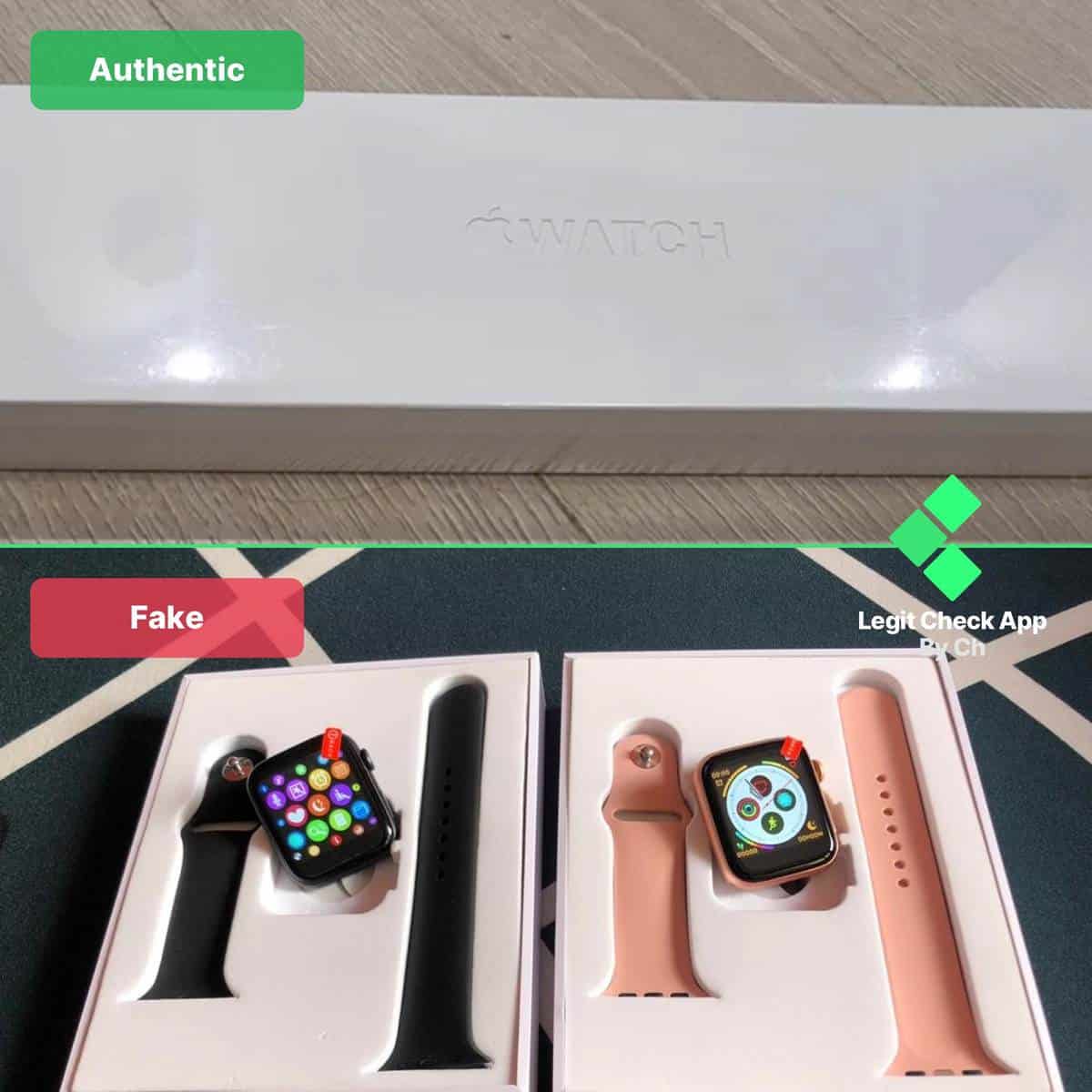
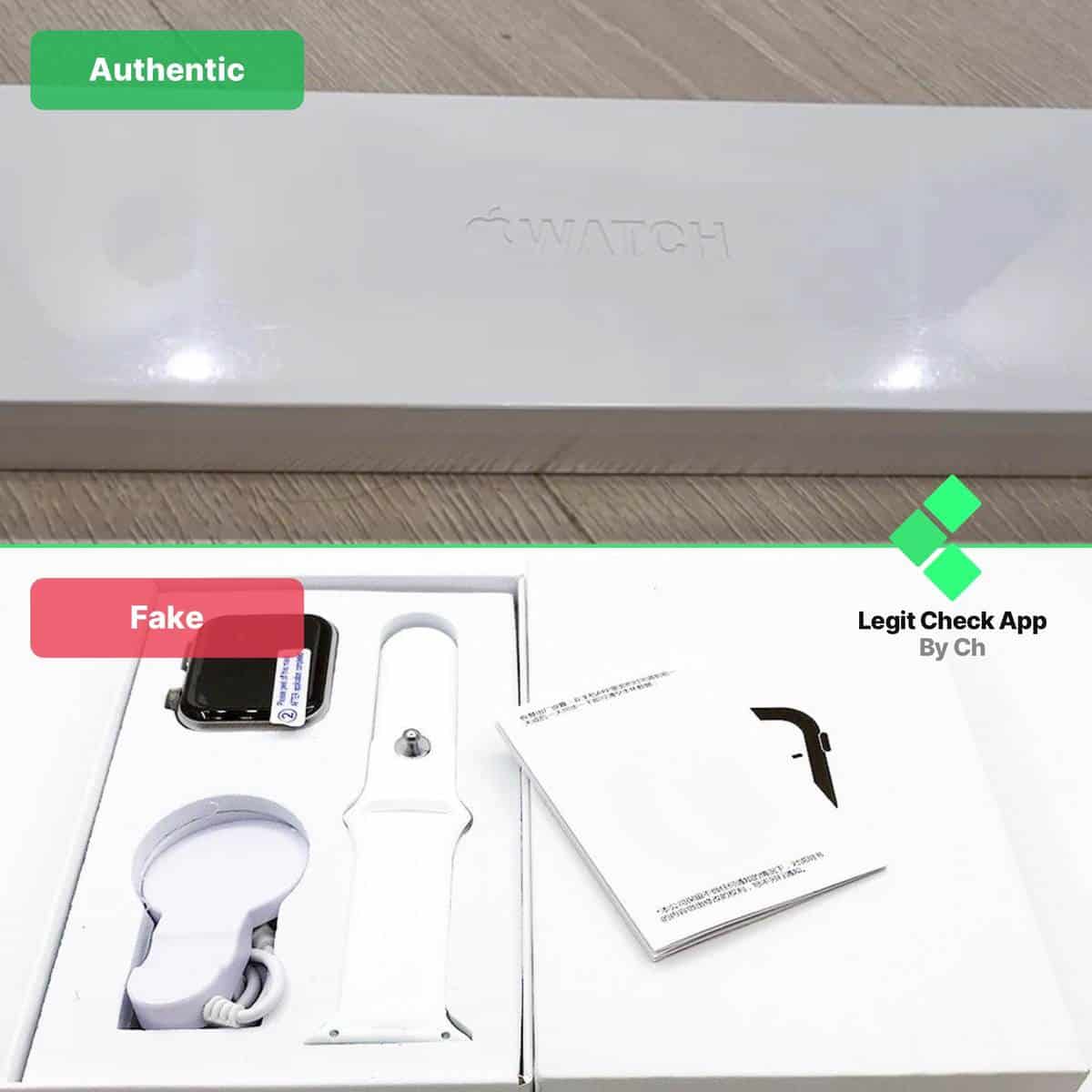
Apple invests heavily in packaging design. It’s part of the product experience.
Genuine boxes have a matte finish with clean edges, and every label (including the model number and serial) matches the watch inside. The printing is subtle yet sharp, with no pixelation or raised ink.
Counterfeits almost always fail this test. Their boxes may imitate Apple’s minimalism but miss the precision – misaligned letters, uneven textures, or light cardboard that bends easily.
If the outer layer scratches easily or the logo is slightly embossed instead of engraved, it’s likely not real.
Also known as the GUI – the graphical user interface.
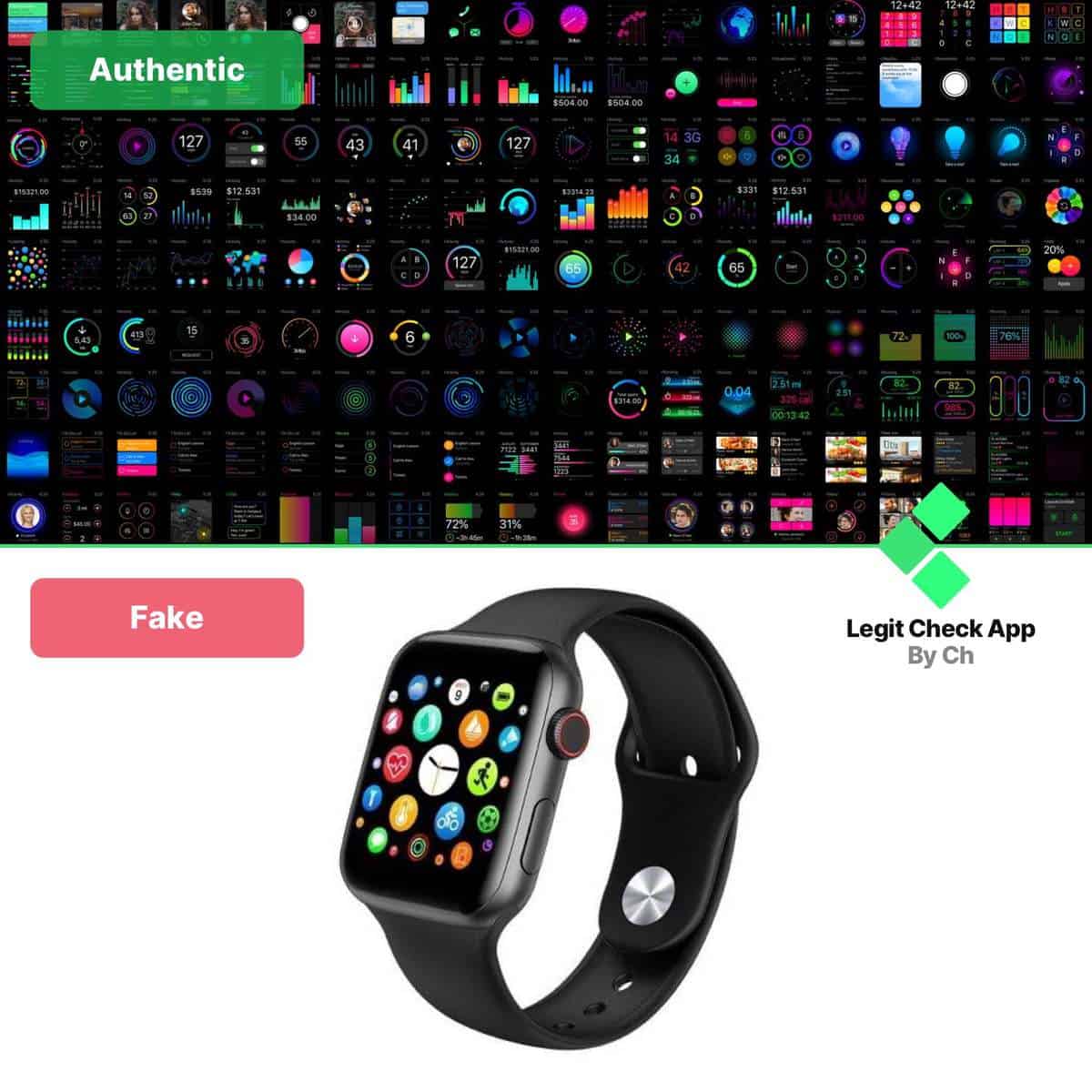
The GUI (graphical user interface) is the easiest giveaway once you power the watch on.
Real Apple Watches feature perfectly rounded app icons that respond fluidly to touch, smooth zoom animations, and integrated features like Siri, Apple Pay, and the Activity rings.
On fake versions, icons look poorly rendered, often with distorted shapes or outdated designs.
The interface may freeze, lag, or show unfamiliar apps unrelated to Apple’s ecosystem. If your watch displays Android-style menus or includes a Settings gear that doesn’t match Apple’s design language, you’re looking at a replica.
Quick check: Try pairing your watch with an iPhone. Genuine Apple Watches will instantly appear in the Watch app and prompt setup automatically – fakes won’t connect at all.
For comparison, traditional watch brands like Patek Philippe and Panerai Luminor use similar serial-matched packaging principles to guarantee authenticity.
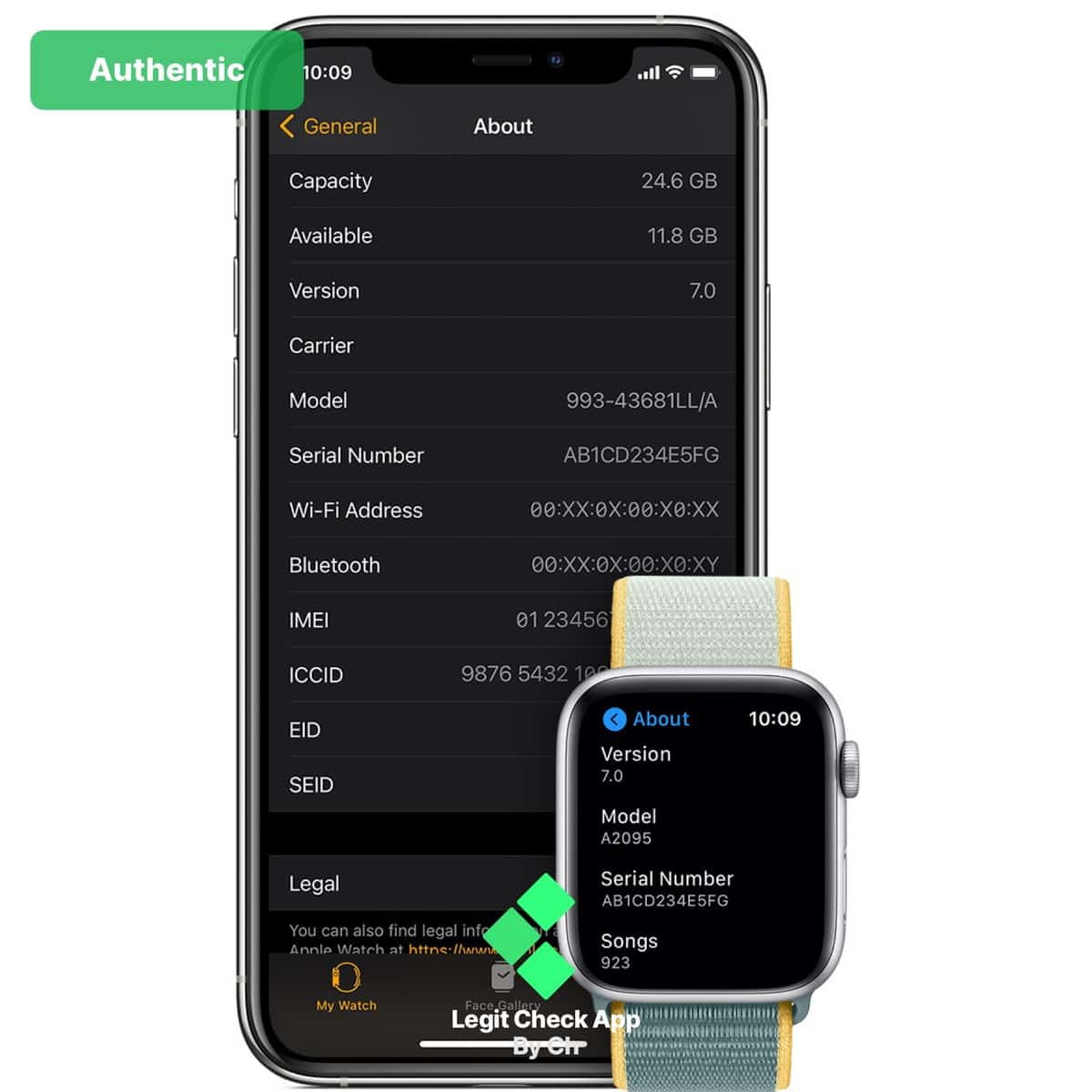
You can confirm authenticity by checking all three locations where the serial number should appear:
If one or more of these sources don’t align, it’s a red flag. Real Apple Watches maintain perfect consistency across all device listings.
Missing or mismatched numbers indicate the watch wasn’t manufactured under Apple’s controlled production system.
Here is the case of a fake Apple Watch:
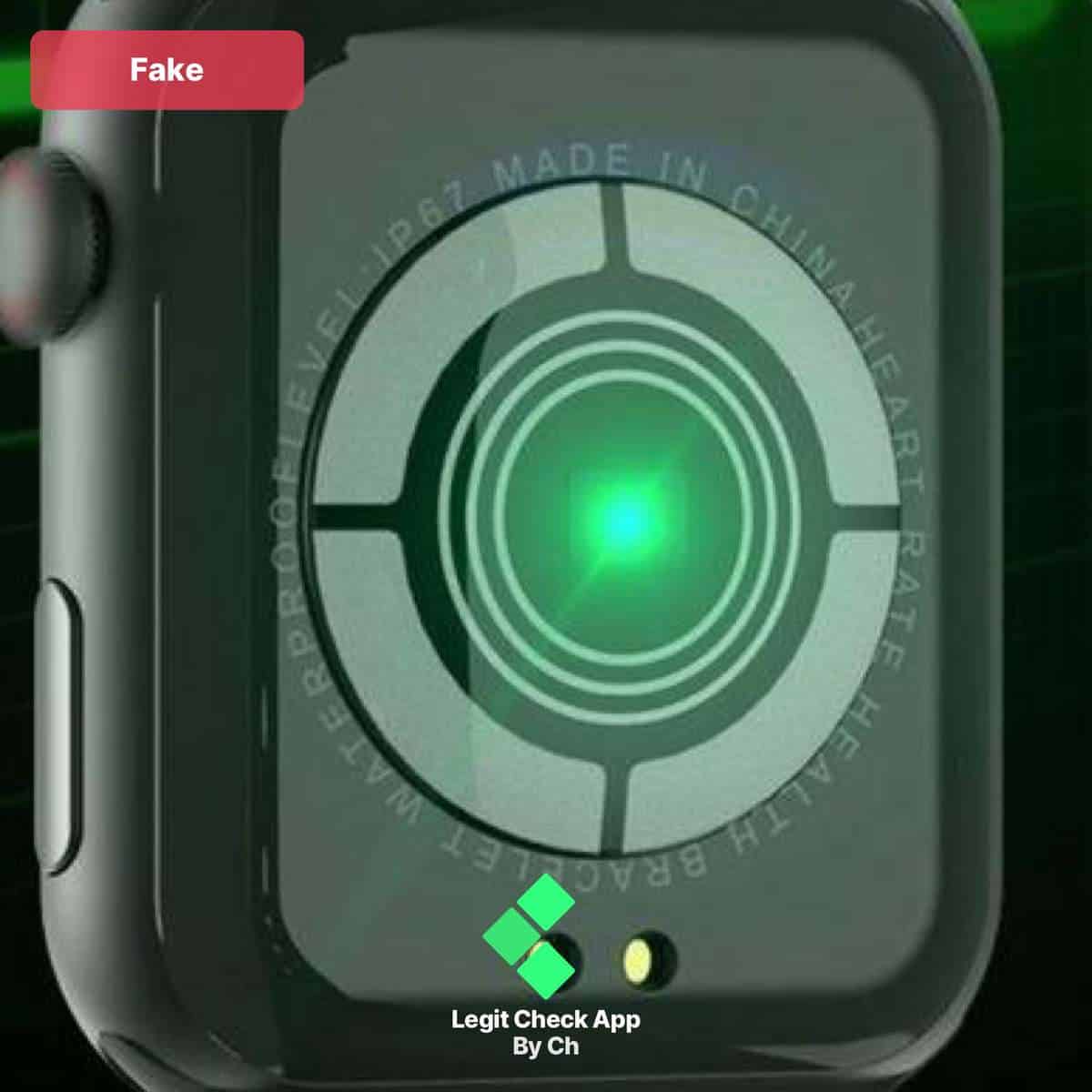
As you can see, the serial code is missing on the back of this Apple Watch Series 6.
The genuine Apple watches must have their serial code listed on the rear side of the case, so keep in mind that this is something you’d have to look out for as well.
Here it is: An authentic Apple Watch, with its serial code engraved on the left side.
As a side detail, this is the genuine serial code that we’ve used for the first step of the guide on how to spot fake Apple watches.

A quick mention:
If in doubt, we recommend double-checking the steps we’ve explained above this line.
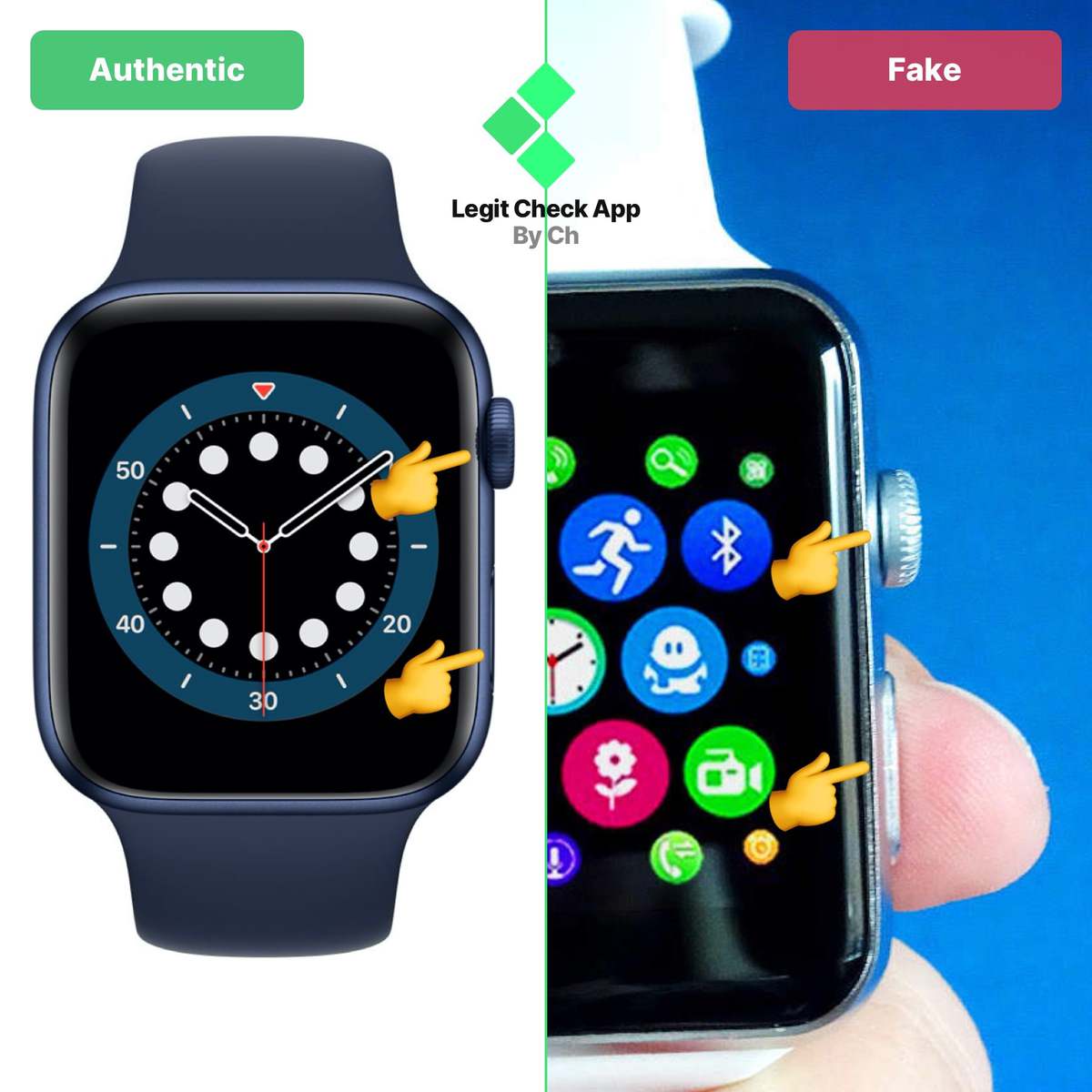
The crown on a genuine Apple Watch serves as both a scroll wheel and a press button – you can feel subtle haptic feedback when navigating menus.
The side button below it opens recent apps or Apple Pay instantly, depending on your settings.
Fakes rarely replicate this dual-function system accurately. Their buttons may lag, lack response, or even break after minimal use.
→ Always test both: rotate the crown to scroll through apps and press the side button to open your Dock.
If either action feels sluggish or unresponsive, the watch is almost certainly not genuine.
Button feedback and resistance testing are common across all precision devices – similar checks are performed on chronograph watches like the Rolex Daytona to verify mechanical integrity.
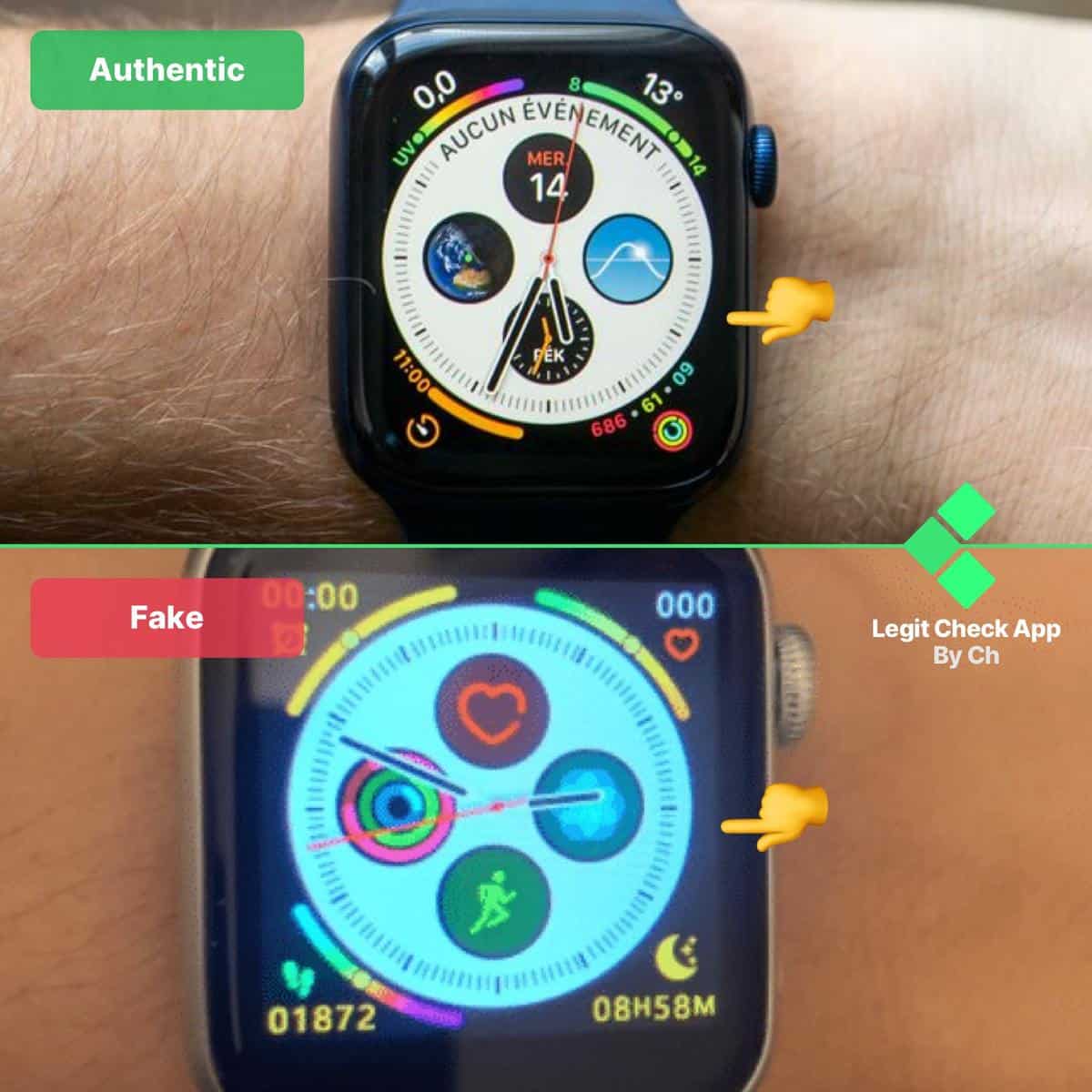
Apple’s display technology is instantly recognizable.
On a genuine watch, blacks blend seamlessly into the bezel, giving the illusion of an edge-to-edge screen. When viewed from an angle, the display remains crisp and readable.
Fakes often exaggerate their glossiness, reflecting every light source around.
Their screens are usually made from cheaper glass or plastic composites that produce glare and visible distortion when tilted.
If you notice excessive reflection or unrealistic color tones, you’re likely handling a replica.
Pro tip: Wake the screen and swipe between watch faces – a genuine Apple Watch will respond instantly with smooth transitions, while replicas often lag or stutter during animation.
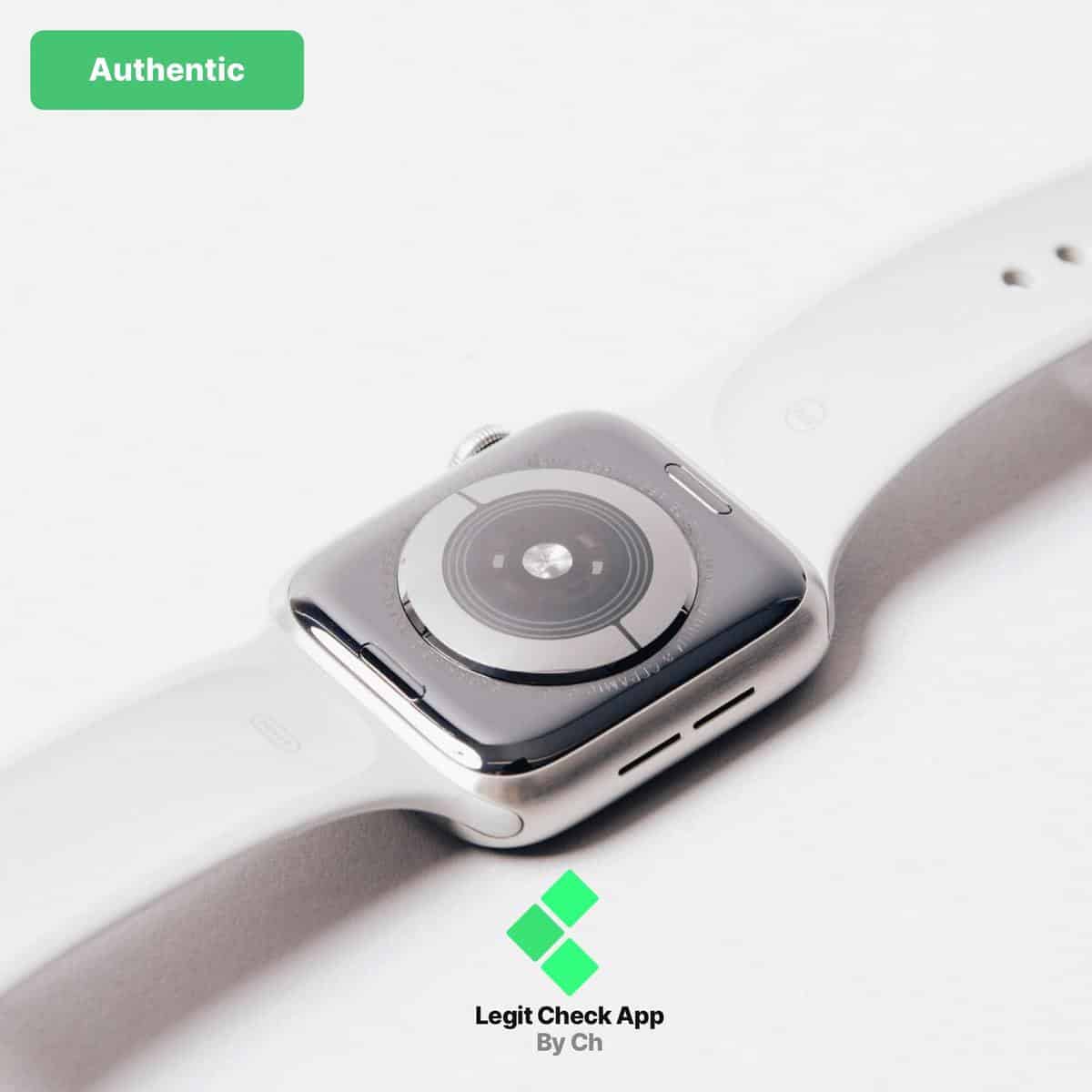
One of the hallmarks of Apple Watch design is modularity – you can swap straps within seconds.
On authentic models, pressing the small button on the back releases the band effortlessly. The slide-in motion feels precise, and once it clicks, the band sits perfectly flush against the case.
Counterfeit models rarely get this mechanism right.
Some fake watches have glued or permanently attached bands, while others use metal clips or generic pin systems instead of Apple’s signature sliding rail.
Even if the band detaches, the fit often feels loose or uneven.
→ If your strap doesn’t release smoothly or doesn’t lock back securely, it’s almost certainly not genuine.
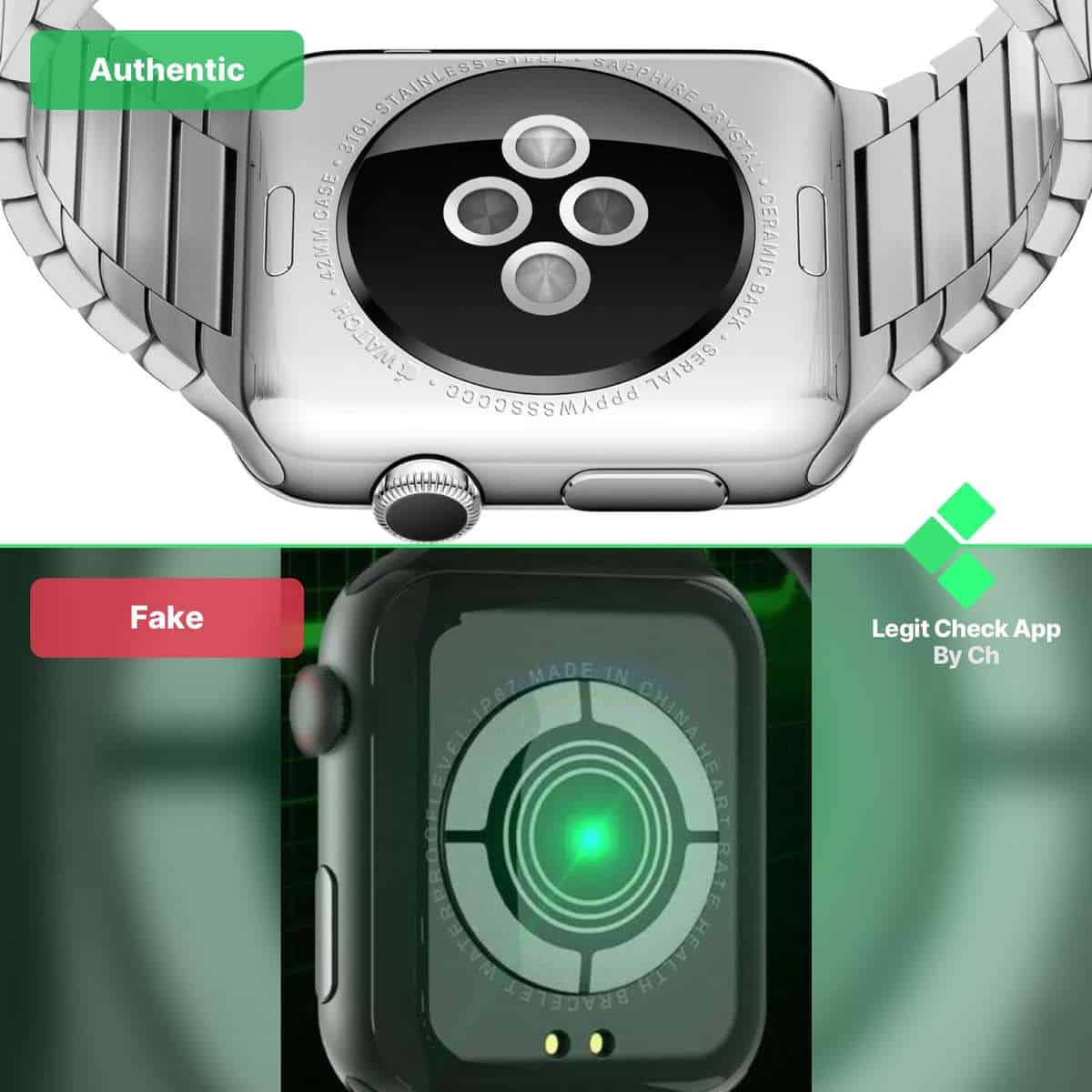
Apple’s sensor design has evolved with each series, but its structure remains unmistakably consistent – polished, circular layout with a reflective inner ring and deep engraving.
The alignment of the sensors is perfect, and the text around the case (“Series 8,” “45mm,” “Titanium,” etc.) is evenly spaced with flawless curvature.
Replicas often break this symmetry. Their sensors may be placed too close together or arranged in the wrong shape. Some even mimic the look with printed graphics instead of actual optical sensors.
If you notice incorrect spacing, off-center text, or lightweight plastic materials on the back, the watch is definitely not authentic.
Quick check: Lift the watch and move it under light. The rear surface of a genuine Apple Watch reflects light smoothly like glass. Fakes scatter light unevenly, revealing lower-quality materials.
Engraving accuracy and symmetry matter here just as much as they do in mechanical timepieces like the Audemars Piguet Royal Oak or IWC Portuguese both known for immaculate caseback finishes.
Short on time? Here’s the fast recap of the 8 essential checks to confirm your Apple Watch is 100% genuine:
Perform these eight checks and you’ll instantly know if your Apple Watch is the real deal or a replica – no tools needed.
If you are considering a pre-owned Apple Watch, here is a clean authenticity-check you can run.
I start with the serial lookup on Apple’s website, then move to packaging quality and a quick visual pass on the on-watch icons.
Keep this handy if you are meeting a seller, need a fast visual reference, or want to sanity-check a recent purchase.
let’s talk about how you can
authenticate an Apple Watch the best
thing you should do is look at the
serial number and enter it in on Apple’s
website once you do that if it’s legit
something like this should pop up and
you want to make sure there’s a check
mark where it says valid purchase date
if something like this comes up that is
a definite red flag another thing you
can look at is the Box Apple products
use really high quality materials so the
boxes and packaging will feel very dirty
able we often see that replica boxes
feel worse quality just right off the
bat the print throughout the Box on
replicas might be less clear or if it
like has scratches on it and you’re just
buying it that’s obviously a red flag
oftentimes on replicas the text on the
box will be peeling or appear faded so
look out for that you’ll also want to
look at the icons themselves on the
watch that’s always a good indicator
when you compare them to the authentic
version icon
Counterfeit Apple Watches have become surprisingly sophisticated – they mimic the packaging, copy the display, and even attempt to fake watchOS.
But one thing they can’t duplicate is Apple’s hardware identity and manufacturing precision. That’s why proper authentication is essential before you buy or resell.
Our Apple Watch authentication service is performed entirely by trained human specialists – not automated lookups or quick guesses.
Every device is inspected across both physical and digital identifiers, using Apple’s verification system as well as manual checks on the casing, sensors, and display.
Here’s what we verify on an Apple Watch:
Every authentication ends with a detailed assessment and an official Certificate of Authenticity, which is proof you can use for buyer protection, insurance, or resale value confirmation.
If the device fails, our report includes clear evidence and Apple’s verification reference.
👉 Authenticate your Apple Watch today and confirm whether it’s genuine before you connect it to your iPhone or spend a single dollar more.
A real Apple Watch doesn’t just look right – it behaves right.
When the serial validates on Apple’s site, watchOS pairs instantly, the crown gives crisp haptic clicks, and the display stays silky under motion and light. Stack those signals and fakes fall apart fast.
Key points to revisit
Still unsure?
Don’t guess with your iPhone on the line.
Our specialists confirm serial status, watchOS behavior, sensor layout, and hardware fit/finish, then issue a Certificate of Authenticity you can use for resale, insurance, or disputes.
👉 Authenticate your Apple Watch today and turn a quick check into total certainty.
We verify what imitators can’t fake: serial checks against Apple’s database, real watchOS behavior, and hardware fit & finish.
Human specialists • 24–48 h turnaround • Thousands of electronics checks since 2017
For other authentication guides like this, check out our watches hub.
Yes, on fakes, the on-screen serial can be spoofed, but replicas almost never match Apple’s full consistency checks. Verify the serial in three places:
Find it in Settings → General → About, and on the caseback (or inside the band channel). Go to checkcoverage.apple.com, enter the serial, and complete the CAPTCHA. A real watch shows:
Not directly online, but you can avoid stolen units by checking Activation Lock and provenance. When pairing, a previously linked watch will request the original owner’s Apple ID – that lock cannot be bypassed by sellers.
Require the seller to unpair from their iPhone in front of you (this disables Activation Lock and triggers Apple’s server-side removal), and provide matching proof of purchase (name, store, date).
If the watch is erased yet still asks for someone else’s Apple ID, or the seller refuses to unpair, don’t buy. You can also report the serial to local authorities if you suspect theft.
No. Replicas typically run skinned Android with toy-grade sensors. They may mimic Apple’s UI but lack certified PPG, ECG, SpO₂, or skin-temperature hardware/algorithms, so readings are wildly inaccurate (or simulated). Many also exfiltrate data to unknown apps/servers.
If you care about health metrics, only a real Apple Watch running watchOS (with ECG/SpO₂ features on supported regions/models) is suitable. And even then, it’s consumer-grade, not medical advice.
Cross-check the paperwork like you would the watch:
Other authenticity-check guides for you
The guides below follow the same evidence-based approach, covering other popular Apple and tech-related devices that attract similar buyers.